
The gaming peripheral market has seen a rapid change in recent years. Users now look for high performance and low weight. The MCHOSE A5 V3 is a new entry in this competitive field. It aims to offer top-tier specs at a fair price. This review looks at the technical aspects of the device. We will study the build, the sensor, and the internal hardware.
In the past, gaming mice were heavy and full of lights. Today, the trend is different. Minimalist designs are now the standard for pro players. The MCHOSE A5 series follows this trend. The V3 model is the top version in this line. it features the best sensor and the most stable wireless chip. These parts are key for a good gaming experience. We will explore how these parts work together. This review will help you understand if the A5 V3 is right for your desk. It is a tool made for speed and accuracy.
Check the availability and price of in the link below
Architectural Design and Ergonomic Profile
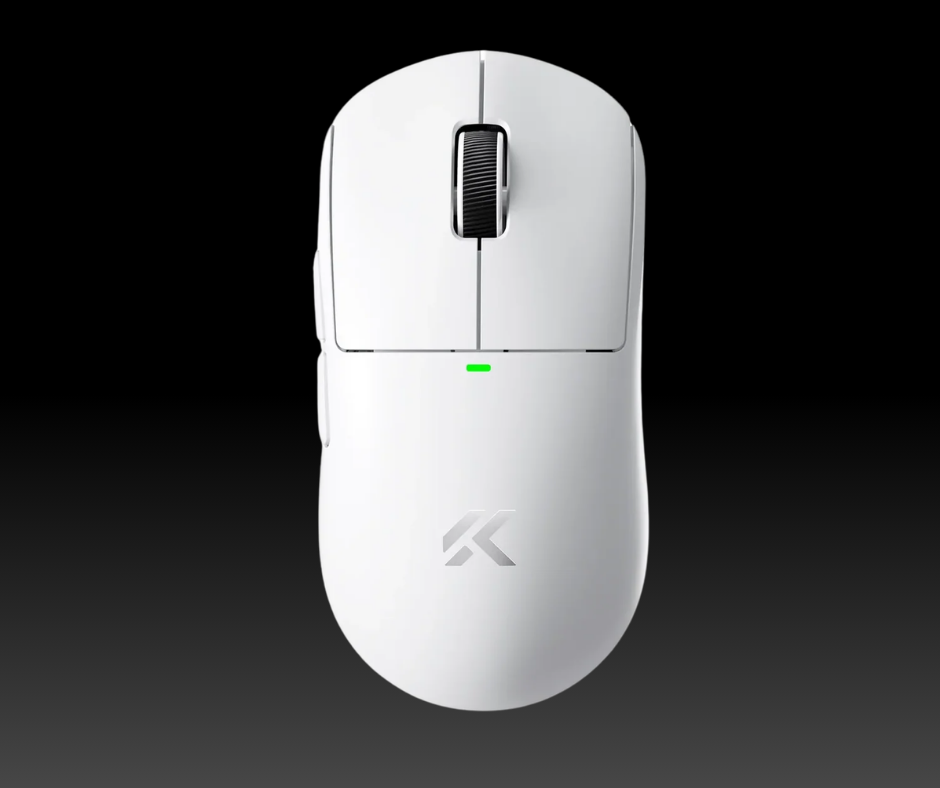
The shape of a mouse is its most vital trait. The MCHOSE A5 V3 uses a safe, symmetrical shape. This design is very similar to the Logitech G Pro X Superlight. It is a shape that many people find comfortable. It works well for palm, claw, and fingertip grips.
The sides are slightly curved to help with finger placement. This helps the user keep a steady hold during fast movements. The hump in the middle is moderate. It provides enough support for the palm without being too tall. This makes it a versatile choice for different hand sizes. The design is simple and clean.
The build material is a high-quality plastic. It feels solid and does not creak when pressed hard. The surface has a fine matte finish. This coating helps with grip even if your hands get sweaty. It does not show fingerprints easily, which keeps the mouse looking new. The weight of the V3 model is around 59 grams. This is very light for a mouse with a 500mAh battery. Achieving this weight without holes in the shell is impressive. It shows that MCHOSE focused on structural efficiency. A light mouse reduces wrist strain over long hours. This is a key factor for professional use.
On the bottom, we find the PTFE feet. These feet are white and have rounded edges. Rounded edges are good because they do not snag on cloth pads. The glide is smooth and consistent. There is a small storage slot for the USB receiver on the bottom too. This is a nice touch for people who travel.
The power switch is also located here. It allows you to toggle between 2.4GHz wireless and Bluetooth modes. Overall, the physical design is well-thought-out. It prioritizes function over flashy looks. This approach is often favored in academic and professional settings.
Technical Internals and Sensor Performance
The heart of any gaming mouse is the sensor. The MCHOSE A5 V3 uses the PixArt PAW3395 sensor. This is one of the best sensors on the market today. It offers a maximum DPI of 26,000. While few people use such a high DPI, it shows the sensor’s range.
The sensor also tracks at 650 inches per second. This means it can keep up with the fastest hand flicks. It has an acceleration rating of 50G. These specs ensure that every move you make is translated perfectly on screen. There is no jitter or spin-out during high-speed play. Accuracy is the main goal here.
One great feature of the PAW3395 is Motion Sync. This tech aligns the sensor data with the PC polling events. It makes the cursor movement feel much smoother. In the A5 V3, this feature works very well. The mouse feels very responsive. Users will notice a direct link between their hand and the cursor.
This is vital for tasks that require high precision. Whether you are gaming or doing graphic design, the sensor performs. It works well on many surfaces, including glass mouse pads. This versatility is a strong point for the device.
The mouse is powered by the Nordic 52840 MCU. The MCU is the brain that handles all data. Nordic chips are known for their efficiency and stability. They help maintain a strong wireless link. The A5 V3 supports a 4KHz polling rate. Some versions even support up to 8KHz with the right dongle.
High polling rates reduce the delay between the mouse and the PC. At 4KHz, the delay is just 0.25 milliseconds. This makes the mouse feel incredibly fast. Most users will find that the 1KHz setting is enough for daily tasks. However, the option for 4KHz is there for those who want the best performance.
Mechanical Switches and Tactile Feedback
The buttons on a mouse define the user experience. MCHOSE chose Huano Blue Shell Pink Dot switches for the A5 V3. These switches are famous for their crisp feel. they have a lifespan of 80 million clicks. This makes them very durable for long-term use.
The click is not too heavy and not too light. It has a clear tactile bump that you can feel. This feedback is important for knowing when an action is taken. The sound is a sharp click that is not too loud. The main buttons have very little pre-travel or post-travel. This means the click happens almost as soon as you press.
The scroll wheel is also a key part of the mouse. It uses a TTC Gold encoder. This encoder provides distinct steps as you scroll. It is not a free-spinning wheel, which is good for precision. You can feel each notch as you move it. This is helpful when switching weapons in a game or scrolling through code. The wheel is covered in a rubber ring for better grip.
The middle click is firm but easy to press. It does not feel mushy at all. Side buttons are placed on the left side of the mouse. They are thin and easy to reach with the thumb. They also use high-quality switches for a consistent feel.
The balance of the clicks is uniform. Both the left and right buttons feel very similar in weight. This is a sign of good quality control. In cheaper mice, one button might feel different from the other. MCHOSE has done a good job of keeping the feel consistent.
The shell design helps prevent the buttons from grinding against each other. This attention to detail makes the A5 V3 feel like a premium tool. Every press gives the user a sense of control. This tactile feedback is a core part of the product’s value.
Connectivity and Battery Management
The MCHOSE A5 V3 offers three ways to connect. The first is 2.4GHz wireless. This mode uses the USB dongle for the lowest lag. It is the best mode for gaming. The second mode is Bluetooth. Bluetooth is great for saving battery and connecting to laptops. It does not need a dongle, which is very convenient. The third mode is wired. You can use the included USB-C cable to charge and play at the same time. The cable is a soft paracord type. It is very flexible and does not drag on the desk. This makes the wired mode very usable if your battery runs low.
The battery inside is a 500mAh cell. For a 59-gram mouse, this is a large capacity. In 1KHz mode, the battery can last for many days of use. If you switch to 4KHz mode, the battery will drain faster. This is because the mouse sends data four times as often.
Even so, the Nordic chip helps manage the power well. The mouse goes into a sleep mode when not in use. It wakes up instantly when you move it. There is no lag when waking up, which is a common issue in cheaper mice. You can check the battery level in the software.
The software for the MCHOSE A5 V3 is simple to use. It allows you to change the DPI steps and the polling rate. You can also remap any of the buttons to different functions. There is an option to set macros as well. The software is lightweight and does not take up many system resources. You can save your settings directly to the mouse. This means you can take the mouse to another PC and your settings will stay. This onboard memory is a must-have for pro users. It ensures a consistent experience across different devices.
Conclusion
When we look at the market, the A5 V3 stands out. It competes directly with mice that cost much more. The shape is a proven winner for many users. The internal parts are the same as those found in flagship models. Compared to the Logitech G Pro X Superlight, the A5 V3 offers a similar shape at a lower price. It also adds a higher polling rate. While the Logitech software is more polished, the MCHOSE software is functional. The build quality is very close to the top brands. For most people, the A5 V3 offers better value for the money.
There are very few downsides to this device. Some might find the software a bit basic. Others might prefer a different shape. However, for a symmetrical lightweight mouse, it hits all the right notes. It is a reliable tool for both work and play. The sensor is top-tier, and the battery life is solid. The inclusion of a 4K dongle in some kits is a huge plus. It shows that MCHOSE wants to cater to the enthusiast crowd. The mouse performs exactly as the specs suggest. There are no hidden flaws or major issues to report.
In conclusion, the MCHOSE A5 V3 is a strong contender in the peripheral space. It combines a classic shape with modern technology. The use of the PAW3395 and Nordic 52840 makes it a technical powerhouse. It is light, fast, and accurate. For those looking for a high-performance mouse without a high price tag, this is an excellent choice. It meets the demands of modern gaming and professional tasks. The A5 V3 is a clear example of how far budget-friendly mice have come. It is a well-engineered device that deserves its place on any desk.
Check the availability and price of in the link below
Disclaimer: This page contains links that are part of different affiliate programs. If you click and purchase anything through those links, I may earn a small commission at no extra cost to you. Click here for more information.